Fast offense search
Find the applicable supported charge by citation, title, keyword, or common terminology without digging through scattered references.
Search the offense, select the applicable circumstances, and let NJCA assemble structured charging language for officer review and verification—without writing every complaint from scratch.
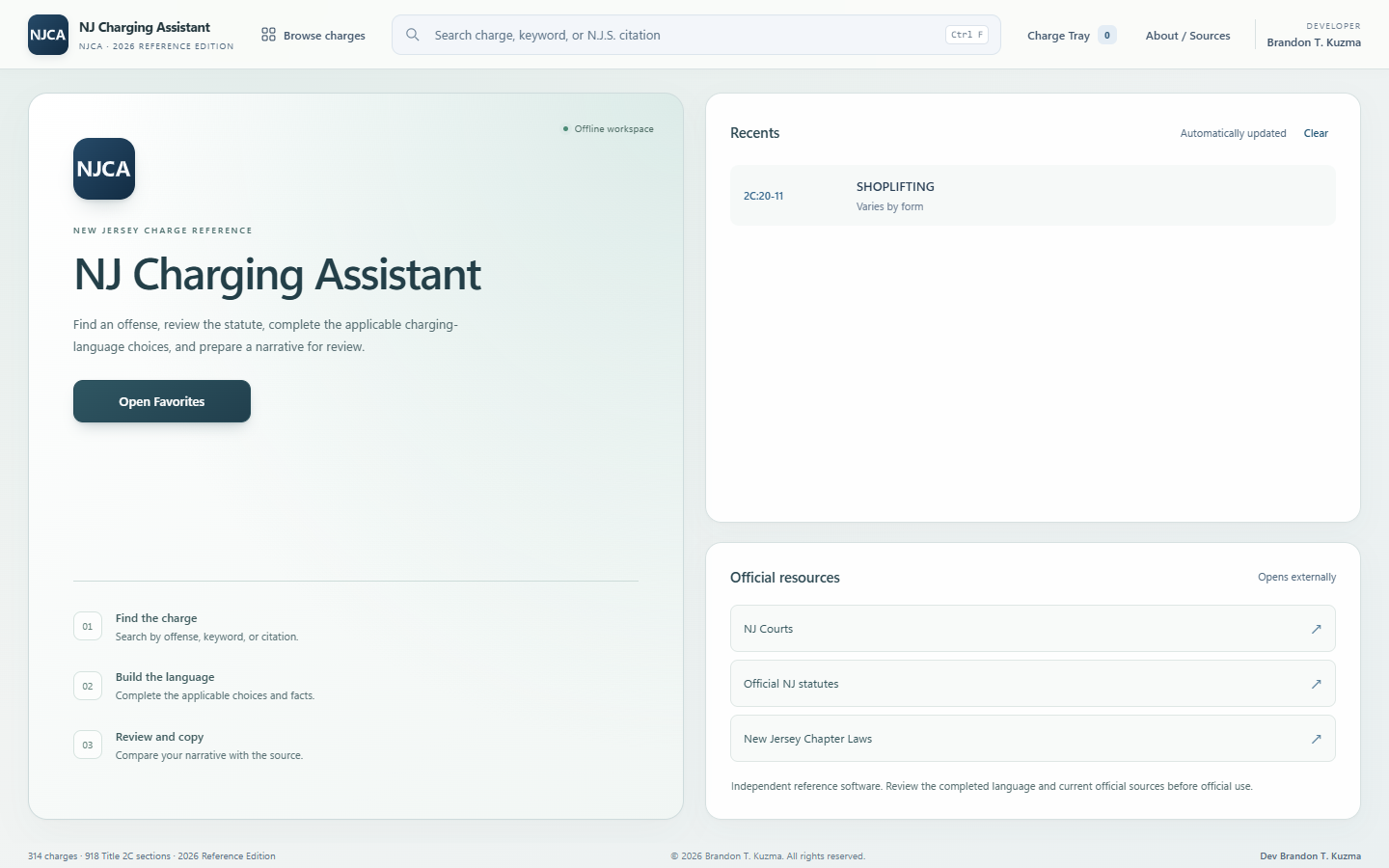
NJCA replaces repetitive manual drafting with one structured workflow: find the offense, choose the applicable charging options, enter the requested facts, and review the completed language as it updates.
Grading information, reference forms, and official source access remain close at hand so the officer can verify the draft before use.
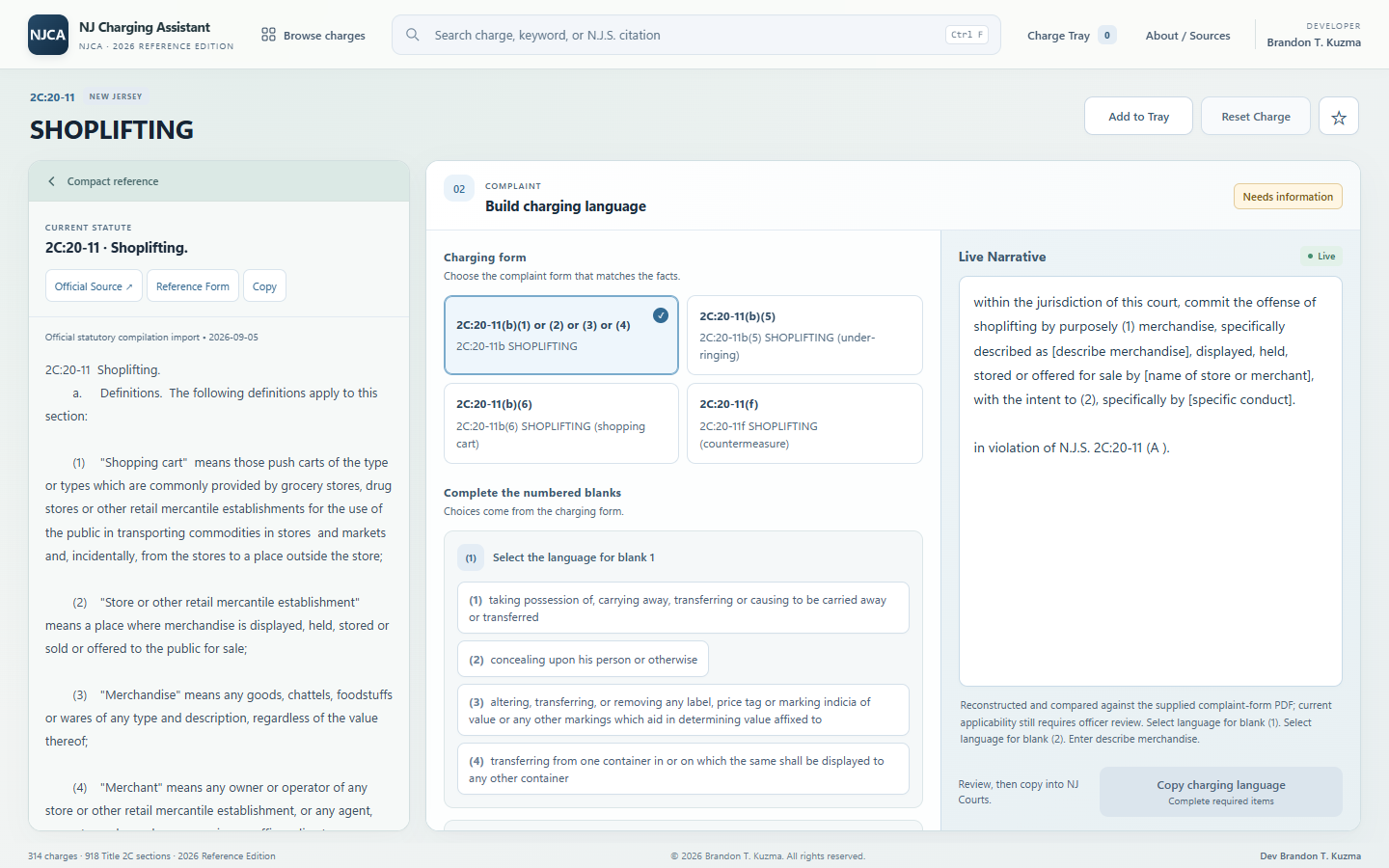
Actual NJCA application screens showing the fast, guided charge-drafting workflow.
Find the applicable supported charge by citation, title, keyword, or common terminology without digging through scattered references.
Select the applicable offense-specific circumstances and factual inputs instead of composing the entire complaint manually.
NJCA assembles structured charging language from the options and facts the officer selects.
See the charging language update immediately as selections are made and factual fields are completed.
Review supported offense-specific grading and quickly inspect source-backed reference forms when needed.
Jump to official authority for final verification, then copy the reviewed charging draft for use according to agency procedure.
NJCA accelerates the repetitive work of assembling a charge while keeping the officer’s judgment and verification responsibility clear.
View purchase optionsFind the applicable supported offense or statutory citation.
Choose the circumstances that apply and enter the facts requested by the supported form.
NJCA assembles the selected options and factual entries into a structured charging narrative.
Check the draft against the incident facts, current law, agency policy, and prosecutorial guidance before copying or using it according to agency procedure.
Give personnel quick access to offense-specific charging options, reduce repetitive manual drafting, and keep source material available for review. Contact NJCA for quotes, purchase orders, invoices, multi-device licensing, and procurement documentation.
Direct purchases use Stripe-hosted checkout. Department and multi-device purchases can be handled by quote, invoice, or purchase order.
Licensed for installation and use on one device, subject to the NJCA Terms of Use.
NJ Charging Assistant is an independent desktop application that helps New Jersey law-enforcement personnel draft supported criminal charges faster. The officer searches for an offense, selects the applicable circumstances, enters the requested facts, and reviews the structured charging language NJCA assembles.
NJCA is designed for authorized professional users who work with New Jersey criminal charging information. Access and use remain subject to each user’s agency rules, duties, training, and applicable law.
No. NJCA is privately and independently developed. It is not affiliated with or endorsed by the State of New Jersey, the New Jersey Judiciary, or any governmental agency.
No. NJCA accelerates drafting after the user identifies and selects the applicable charge and circumstances. The user remains responsible for the charging decision, reviewing the completed draft, verifying the facts, and confirming it against current controlling law, agency policy, prosecutorial guidance, and other applicable authority.
The core charging-reference workflow is designed for local, offline use. Internet access is required for optional actions such as opening external official sources, submitting a bug report, or completing a purchase.
Update delivery terms have not yet been finalized. Current release and update information will be provided with purchase and support communications.
For the initial release, the customer receives setup instructions after purchase and provides the device identifier needed for NJCA to issue a signed license for that device.
Yes. Departments can contact NJCA support for multi-device quotes, invoices, purchase orders, procurement documentation, and deployment questions.
Use the Report a Bug feature inside NJCA or email NJCASUPPORT@gmail.com. Do not send confidential investigative, case, evidentiary, or protected information.
General questions, department purchasing, and product support are handled through one business contact.
NJCA is not affiliated with or endorsed by the State of New Jersey, the New Jersey Judiciary, or any governmental agency. Users remain responsible for evaluating the facts and verifying charging decisions against current law, agency policy, prosecutorial guidance, and other applicable authority.